
01
Administrators
- Venue matches and videos shows only content within the current account's permissions.
- Filter by match, order, field, camera or video state.
- Processing: the camera has stopped and internal recording segments may be arriving, but the final merged file is not ready.
- Missing playback URL: an archive result exists, but no safe HTTPS delivery URL is currently available.
- Playable: the final merged MP4 is ready. Play and Download create short-lived safe URLs for this order.
- If a URL expires, start Play or Download again from the original order or list; do not save and forward an old media URL.
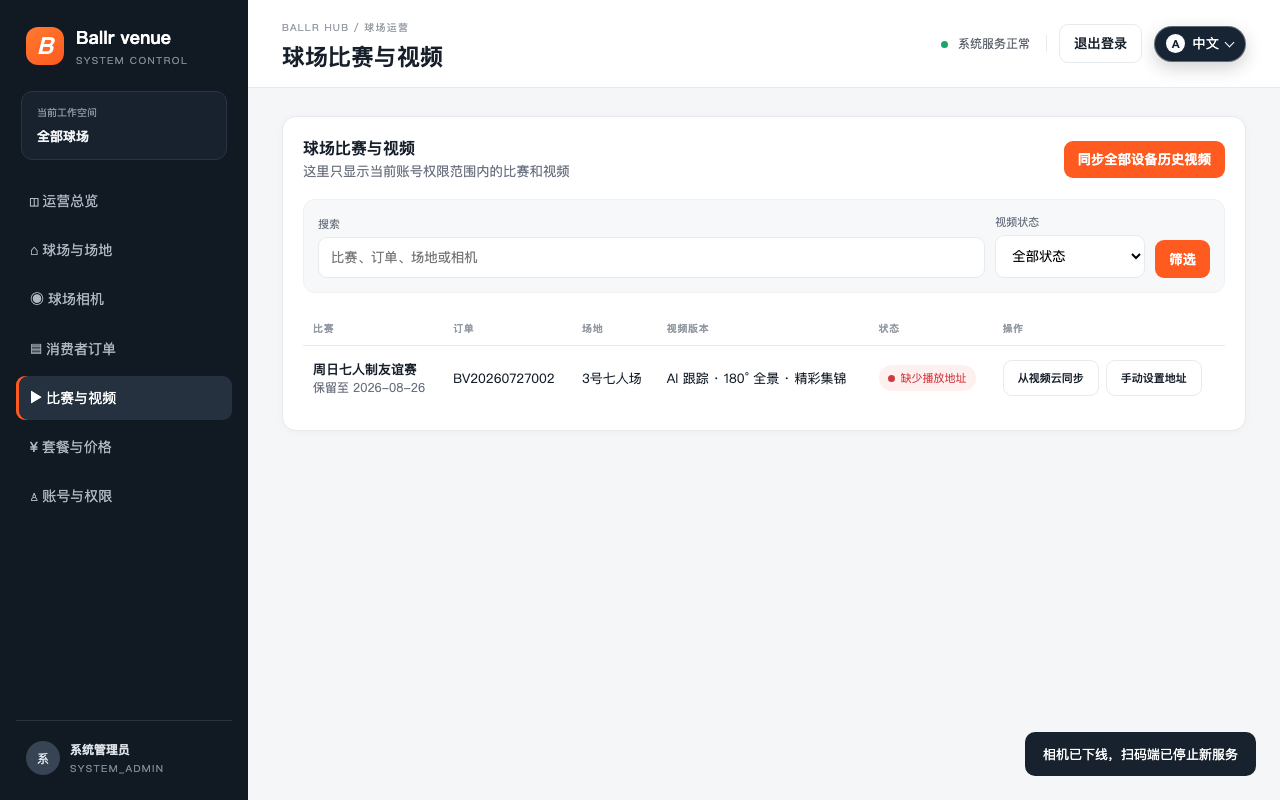 View full size ↗
This real product screenshot identifies the workflow path. Follow the version note and current on-screen labels; replace an older versioned image with a sanitized current screenshot before publishing.
02
Paying users
- Receiving recording segments does not make separate downloadable videos appear during the match.
- After stopping, the cloud creates one final merged MP4 for the order, so My videos may temporarily show Processing.
- When ready, play or download from This match recording on the original order or from My videos. Do not search across orders.
- Only the current paid order's final recording is shown; another user's private link does not grant access.
Complete
If your screen differs from this guide, check the camera model, App or firmware version, account role and organization service status.
Did this guide solve the issue?Send feedback