
Live modes and credits
- Administrators can view live sessions and camera states within the organization.
- Starting still requires an available camera, verified internet and complete live configuration.
- Hub2's basic live functions and custom RTMP do not consume Ballr Live credits.
- Each successful Ballr Live start consumes one credit; a failed start returns it automatically. Current packs are one live session for ¥50, 10 for ¥400 and 20 for ¥600; follow the price shown under Plans and usage.
- Hub2 2.3.179 expands the full credit history inline and supports pagination under Plans and usage.
- After the state says Live, open the viewer side and verify real video.
Analytics and plans
- Analytics availability depends on organization service status and account permission.
- If locked or unavailable, an administrator with plan permission should check Plans and usage.
- Ordinary playback, manual events and manual clips are handled separately from AI or analytics permission.
- Analytics permission does not affect basic live functions or custom RTMP; Ballr Live additionally requires an available live credit.
Official live scoreboard
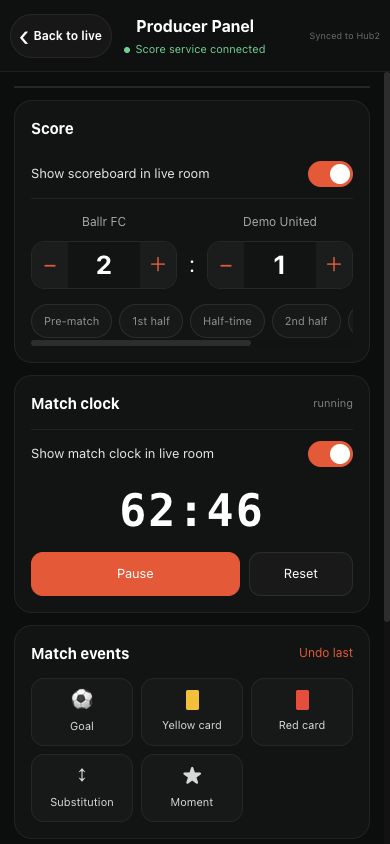
- The official Hub2 live room shows teams, score, period and clock updated by an authorized App operator.
- Video can continue if score or events temporarily stop updating; do not mistake a score-service issue for a stream interruption.
- Custom RTMP is separate from official Ballr Live and does not show the Hub2 official scoreboard overlay.
 View full size ↗
Teams, score, period and clock in the official Hub live room are updated by an authorized operator from Manage live in the App. The screenshot contains sanitized demo data.
Upload and enable in Ballr Hub
- 1
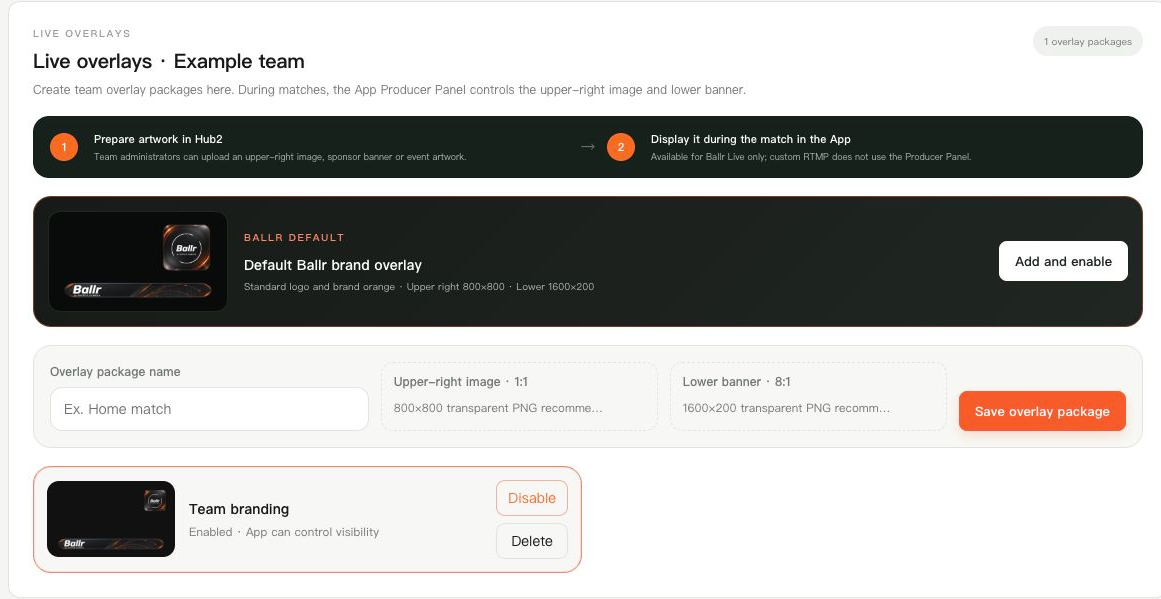
Sign in to Ballr Hub, open Live in the team workspace and find Live overlays.
- 2
If a team selector appears, select the camera’s team. Otherwise check the displayed team name.
- 3
Enter an Overlay package name and select an Upper-right image and/or Lower banner.
- 4
Choose Save overlay package and wait for its image previews. A newly saved package still needs Enable.
- 5
Check Enabled · App can control visibility. Only one package can be active per team; enabling another disables the previous package.
 View full size ↗
The actual Ballr Hub 2.3.205 overlay component with an example team and no customer data. Note the image requirements, Save control and enabled status.
If your screen differs from this guide, check the camera model, App or firmware version, account role and organization service status.